
Printables
Sub250 OasisFly30 Caddx Ratel Micro 1500TVL Camera mount


- Creator (as listed at the source)
- Ashy
- Licence
- Creative Commons — Attribution — Noncommercial — Share AlikeThe licence is listed by the source marketplace. SliSearch does not verify it.
- File types
- STL
- Pricing
- Free
- Published
- Category
- Electronics
- Downloads
- 3
Overview
Disclaimer: I used AI for the markdown formatting, but it did not do anything else. I wrote and checked all the instructions myself.
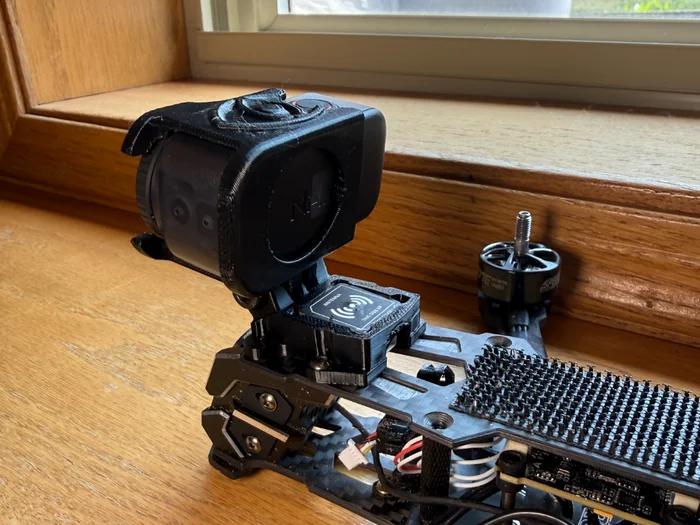
A mount for the Caddx Ratel Micro 1500TVL to fit the Sub250 OasisFly30.
The camera angle is fixed around 30 degrees.
What's required:
- 1x Cam_Bottom_Mount.stl
- 1x Cam_Top_Mount.stl
- 2x Washers.stl (I used nylon washers but provided 3D printed ones which should work just as well)
- 2x M2x8mm screws (I used the spare ones that came with the drone)
Install instructions:
1. Check the guide (Photo 2) for a visual guide.
2. Remove the top plate.
3. Screw in the Cam_Bottom_Mount using the 2x M2x8mm screws.
- Use the washers so the screws don't slip through the holes (see photos for placement).
4. Place the camera in.
- Make sure the connectors on the back face the bottom of the drone. I recommend plugging in the wire now.
5. Snap the Cam_Top_Mount on top of the camera.
- Make sure the camera hasn't rotated, or else the top won't fit.
6. Reinstall the top plate.
Print this model with Slicience
- Download the model from the source page.
- Upload the file to Slicience and get a quote with Prinnu.
Similar models
Chosen by shared tags first, then category. Each one links to its own marketplace.
 DIY vtx plus fan holder !!fpv annything!!whit these models you can fpv annything i used this from aliexpres i put a fan on it becase the vtx will get verry hot and wil maby metlt the plastic i used pla !!!NEVVER TURN ON THE VTX WHEN THE ANTENNA IS LOOSE OR NOT ON THE...
 Sub250 OasisFly30 3D Scans VariousVarious 3D Scans of my OasisFly30 used to make some 3D models, uploading in case anyone else has a need for them. The camera in the scans is the Caddx Ratel Micro 1500TVL.
 GEPRC VAPOR Front GPS and Camera MountFront GPS mount for Geprc Vapor D5 D6 X5 X6 with and without camera attachment available. Moving GPS to the front improves lock time, reception, and weight balance.
 Deepspace Seeker 3 DJI O4 pro camera mountDJI O4 pro mount for Deepspace Seeker 3 fpv frame Print in TPU Happy flying Boost Me Helped you out? Please consider boosting me. Thanks!
 #NLR35 digital Nanolongrange FPV dronewelcome to my new Nanolongrange FPV drone design! This is the 4th and most sophisticated iteration. The design builds on my previous completely 3d printed frame NLR35.
 Cam mount for GEPRC Cinebot 30 (Gopro 8 9 10 11 12 & DJI Action 2)Print & replace orignal Print in PETG or PC Weight in PC is 5.3g tested and works fine Please leave a like if you downloaded it :-)
 OV9281-110 cameraModel intended as a reference for modelling enclosures and mounts into 3D printed fuselages and constructions.
 WALT the Webcam Mount (Logitech C910)Meet the Webcam Arm Lamp Truss or WALT for short, he's here to hold your webcam and remind you to smile while you Skype.
 Iphone 5 Tripod quick-releaseA fast and simple quick-release mount, so you can use your Iphone 5 on your tripod. We shoot a TON of video and photos at my job, but sometimes it just needs to be a quick reference shot.
 Chest Mount Harness for GoPro camerasChest Mount Harness to use with you GoPro camera. I use a Hero 3 so i´m not sure how it will fit newer cameras like Hero 4.
 Super Ultra Compact Pan Tilt Camera Mount - V1[Upgrade 20161001] New Version V2: [Update 20160126] V1 Update: A pan-tilt camera mount for use with FPV aircraft, robots, Raspberry Pi etc. Its ultra small, ultra simple and ultra easy to build.
 Mavic Air 2 GoPro camera mountThe top is a favorable location for ease of takeoff and landing, however, can cause interference with GPS. Thus, always update Home Point before installing the mount. Made to accommodate shrinkage in PLA.
 Primbal Session - 3 Axis Brushless Gimbal for GoPro Session
 Dog collar Gopro mountThis mount locks on to the collar and has mounting holes for the a Gopro See some of the footage I took, on my Youtube channel TO PREVENT RUBBING ON THE DOGS NECK PLEASE ADD SOME SORT OF PADDING AROUND THE MOUNT AND LOOSEN THE...
 Logitech C910 MountThis mount fits the body of the Logitech C910 once the original mounting hardware is removed. The mount fits over the back of the camera and can be secured into place using a M4x22 bolt.
 Gopro Mask MountThis GoPro mount is copied from the Scubapro model. It's a universal support for snorkeling or apnea masks, easily mountable with an electrician plastic band.
 Ring Stick-up Cam BracketI was sick of not having a good vantage point for my Ring Stick-up camera so I designed this nifty mounting bracket for it with snap fit feature for the base and ease of disassembly.
 DeepSpace SEEKER35 DJI O4 Pro Reinforced Antenna MountsThe DeepSpace SEEKER35 DJI O4 Pro Antenna Mount is a TPU replacement mount designed to provide a more secure and protected mounting solution for the DJI O4 Pro antennas on the DeepSpace SEEKER35 frame.
 MG‑F10 GPS MountA compact mounting bracket designed for the MicoAir MG-F10 GPS/GNSS module. It securely holds the module in place and provides a clean installation for drones, UAVs, robots, and other DIY projects.
 Ultra-Light FPV Stack Adapter: 30.5x30.5 to 20x20 mm (M2)🚀 Upgrade Your FPV Build! Ultimate Low-Profile Stack Adapter 🚁 Tired of mismatched electronics and heavy, bulky adapters? Meet the perfect solution for your 5-inch or freestyle quad!
 Camera mounts for the Mark4 5 / 7 inch (V1) FPV drone frameThe archive contains 170 models covering most camera types, from 14 mm to 22 mm, including DJI O3 and O4 for the Mark4 7-inch frame (V1).
 Antenna VTX mount at a 45 angle and horizontal RX mount for the Mark4 7 / 8 / 9 / 10 / 13 inch (V2) FPV drone frameThe archive contains 52 models, 30 of which are antenna mounting parts, and 4 are GPS mounts for up to 22 mm and up to 28 mm. The GPS models are available with a hole for the power supply cable and without it.
 HGLRC Hammer Dual 170mm (Dummy Unit)Model of basic HGLRC Hammer Dual 170mm. You can use it as Dummy unit for modeling a holder for Antennas or parts including antennas.
 "Plasticlamp" Multi-Purpose Clamp: Adjustable Phone Holder, Magnetic Ring Option, Camera Mount, and Flashlight SupportI’ve added a custom Air Vent Insert tested on a 2010 Lexus GS350. It clips securely onto the dashboard air vent louvers and works as a mount for the adjustable phone clamp.
 $5 Handle Better Than Anything On The MarketErgonomic AR and Airsoft grips as camera accessories. Jam-packed with ARRI mounts on 6 sides.
 HGLRC M100-5883 GPS Mount – TBS Source One V6 (5")GPS mount for HGLRC M100-5883 + Source One V6
 Insta360 X4 Air horizontal bracket for chest rigI made this for for use on the insta360 x4 air after utilizing the original mounting hardware and realizing that it flops down after a bit of use due to it being mounted vertically.
 GoPro MISSION 1 TBS ND Mountprint mount side down. i had good results on i3mk3s with ninja flex and organic support structure. It's important to remove all support material in order to fit it to the camera.
 Wall mount for large fpv dronesI've remade the original mesh in cad software and modified the model to be compatible with larger (taller) drones. It fits my 7" with 20mm landing gear perfectly. I've also thickened the arms and added reinforcements.
 Compact Single ESC MountSecure one compact ESC and its wiring in a small two-screw holder for cleaner RC, robotics and electronics builds.
 REOLINK E1 SERIES – IKEA BROR CORNER MOUNTSpace-saving corner mount specifically designed for the Reolink E1 series (E1, E1 Pro, E1 Zoom) on IKEA BROR shelving units.
 XL-RCM 10.0 PIXXY: Pocket drone / FPV quadThe smallest 3D printed FPV/ miniature personal nano UAV platform: XL-RCM 10.0 PIXXY : Pocket drone/FPV quad It is consider the smallest "3D printed" FPV/UAV platform ever made for public/civilian use on the day it was released to the...
 GoPro Session FPV Mount v2GoPro (4 and 5) Session FPV Mount v2 Angles: 0, 15, 20, 25, 30, 35, 40, 45 Weight: 10 - 12.5 grams (PLA, 100% Infill)
 ESP32 WiFi RobotMore info: Code on Github: Video: The ESP32 WiFi robot is a shrunken-down version of the ZeroBot Instead of a Raspberry Pi, it is powered by the similarly popular ESP32.
 UNIVERSAL FPV CAMERA MOUNTThis mount was designed to allow you to use basically any FPV camera and set it at any angle with a single M3 screw.
 Twitch Drone Chassis for ZeroBotMore info: Raspberry SD card Image: By popular request I created this chassis for my Zerobot Raspberry Pi robot. The model is the Shock Drone that is used by the Twitch character in Ubisoft's game Rainbow Six Siege.
 CyBot - 6 axis Robot Arm Cycloidal gearbox drive actuator - RoboticFREE GRIPPER HERE : Buy it here : This is work in progress: I m building a six axis dof cycloidal drive robot arm, As I had a lot of request I already put a first version for download. But I m still working on it !
 Primbal V3 - 3 Axis Brushless Gimbal for Yi/GoProPrimbal V3 is here. Over a year ago I released the original Primbal, one of the only 3D printable brushless gimbal designs. Since then I have been experimenting and revising the design to make Primbal even better.
 Toronto Micro Marathoner
 Ender 3 V3 KE Nebula Camera Mount Bracket (Avoids Tool Rack)I printed the original bracket and found that it collided with the tool rack when the hotend moved to the lowest position. So I modified it to move it away a little bit to avoid colliding with the tool rack.
SliSearch lists public model details and links to the original source. It does not host files or verify licences.