
Cults3D
HYPER HOPPER
Click, spin, drop and back it hops! HYPER HOPPER is the magical device that will train your reflexes as it jumps right back into your hand! SAFETY WARNING: BACK UP! LOOK OUT!


- Creator (as listed at the source)
- SpooliganLabs
- Licence
- CULTS PU - Private UseStated at the source marketplace; SliSearch does not verify licences.
- File types
- 3MF STL
- Pricing
- Paid
- Published
- Category
- Various
- Likes
- 136
- Downloads
- 752
Overview
Click, spin, drop and back it hops! HYPER HOPPER is the magical device that will train your reflexes as it jumps right back into your hand! SAFETY WARNING: BACK UP! LOOK OUT! Hyper Hopper’s tightly looped elastic may propel it UP TO SIX FEET INTO THE AIR in an instant when dropped, and WILL take you by surprise! Please pop from a distance and do not squeeze or tightly grip when mechanism is clicked as it may pinch. Ages 10 and up. No Sales of this print without permission from Spooligan Labs. Send inquires to and thanks for your support! Follow the instructions: 1. NO PET G, PLA ONLY! Do not print mechanism with “silk” “transparent” “glitter” or “metal” PLA filaments. Use those to decorate the top only. 2. PICK A SPOOL & make a TESTER We suggest you first try printing Hopper in a few filaments and then PLAY with them for some time to test the performance of your PLA! See our tested PLA filaments below, in print settings. 3. ASSEMBLY + ELASTIC Hopper assembly is easy! Find a pressure tool (a spoon handle or flat screwdriver) and watch the video here. With a number 33 elastic wrapped 4 times around hops 3-4 feet, and wrapped 4-5 times can hop up to 6 feet. Elastic performance will vary, try a few types of rubber and adjust loop count if need be! We love “AMUU no. 33 black rubber bands“ (Amazon.com) for their long-life performance. You may also use some number 32 elastics, wound one time less than a 33! 4. DROP AND HOP (for smooth action) A new Hopper needs you to play with it! A Hopper starts out stiff and using the mechanism will greatly improve it’s hops the more you click and pop! 5. PRINT SETTINGS and FILAMENT BRANDS Hoppers connections should print completely SOLID and have no hollow areas or VOIDS which cause breakage! 3-4 Walls 0.4 nozzle 0.16 layer height Support OFF Elephant foot = 0.26 (optional for smoother elastic contact surfaces) Bambu PLA Basic, Polymaker PLA, Anycubic PLA+, Elegoo PLA Pro, Snapmaker PLA, Overture PLA+, some Panchroma PLA, Bambu PLA Tough, Duramic PLA+ 6. AUTO POP Auto pop happens when there is too little friction in the mechanism. While this can be caused more slippery PLA recipes it can also occur due to under-extrusion. We recommend flow calibration and also provide a “tighter joints” STL file in cases with finicky filaments. Fix an auto popping Hopper… try this… 1. Click Hopper flat. 2. press the centre rings together firmly on both sides on a table or other surface. By squeezing the flattening the rings you wont break the Hopper and can help compress contact surfaces. Happy printing Spooligans!
Print this with Prinnu
- Download the model file from the source page. SliSearch moves no files.
- Upload the file at slicience.com/quote. Prinnu quotes it in minutes.
Similar models
Chosen by shared tags first, then category. Each one links to its own marketplace.
 SPIN POP GRENADEPrint our most SPIN-TASTIC popper, THE SPIN POP GRENADE!!! How does it work? 1. Press down on the top to collapse the spin popper until it clicks, 2. Hold the top handle and spin before you drop it, 3.
 Hyper Hopper — Flexible Snap-Hop Dome Toy (4 Size Variants)Meet the HYPER HOPPER — a wide, flat, thin flexible dome that you press to invert and watch it spring (hop) right back.
 Hyper Hopper Spring DomeA playful spring-powered pop dome toy that compresses, flips, and hops back into action. Print-ready and compact, it makes a satisfying desk toy, fidget gadget, or fun gift for makers of all ages.
 PaperCut - The Worlds Thinnest BalisongPaperCut – World’s Thinnest Balisong PaperCut is an ultra-thin, 3D-printable balisong-style fidget/prop designed to feel almost impossibly slim while still being satisfying to flip.
 best 3D-printable bearing
 Gimbal Fidget — Two-Axis Print-in-Place Desk Toy | NoSupportA hex-framed disc that pivots on two axes at once, printed as one piece with nothing to assemble. Hold the frame, turn it any direction you like, and the disc inside carries on doing its own thing.
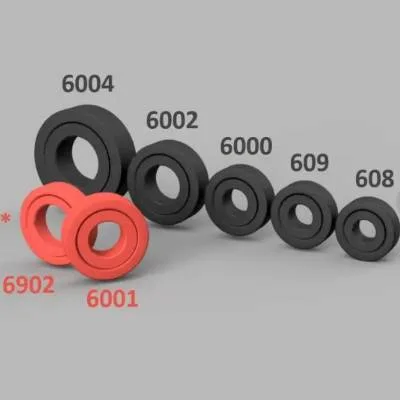 Ball Bearings Print in placeDesign Concept The ball bearings are designed for convenient printing without the need for assembly, providing a comprehensive set of different sizes.
 Heart FidgetSimple print-in-place fidget in the shape of a heart. I recommend printing in two or more colors using CFS.
 GravityLock: The Print-in-Place Mechanical Tool OrganizerStop fumbling with messy closets and garage clutter. The GravityLock is a high-performance mechanical tool holder that uses a compliant hinge system to secure your tools using only their own weight.
 Fully 3D-printable turntable
SliSearch is an index: it stores public metadata only, does not host files, does not verify licences, and has no partnership or affiliation with the indexed marketplaces.